
在VitePress中使用Vue
在VitePress的md中,可以使用Vue功能。
模板化
插值语法
可以在文本中使用 Vue 的插值语法:
输入
{{ 1 + 1 }}输出
2指令
也可以使用指令:
输入
html
<span v-for="i in 3">{{ i }}</span>输出
1 2 3提示
markdown原版也可以使用html。不过markdown原版不能使用vue语法。
<script> 和 <style>
所有标签都应放在 frontmatter 之后。
html
---
hello: world
---

<script setup>
  import { ref } from "vue";

  const count = ref(0);
</script>

The count is : {{count}}

<button :class="$style.button" @click="count++">Increment</button>

<style module>
  .button {
    color: red;
    font-weight: bold;
  }
</style>
效果:
The count is : 0
警告
避免在 Markdown 中使用 <style scoped>
在 Markdown 中使用时,<style scoped> 需要为当前页面的每个元素添加特殊属性,这将显著增加页面的大小。当我们需要局部范围的样式时 <style module> 是首选。
还可以访问 VitePress 的运行时 API,例如 useData 辅助函数,它提供了当前页面的元数据:
html
<script setup>
    import { useData } from 'vitepress'
    const data = useData()
    console.log('data的内容:', data)
</script>
效果:
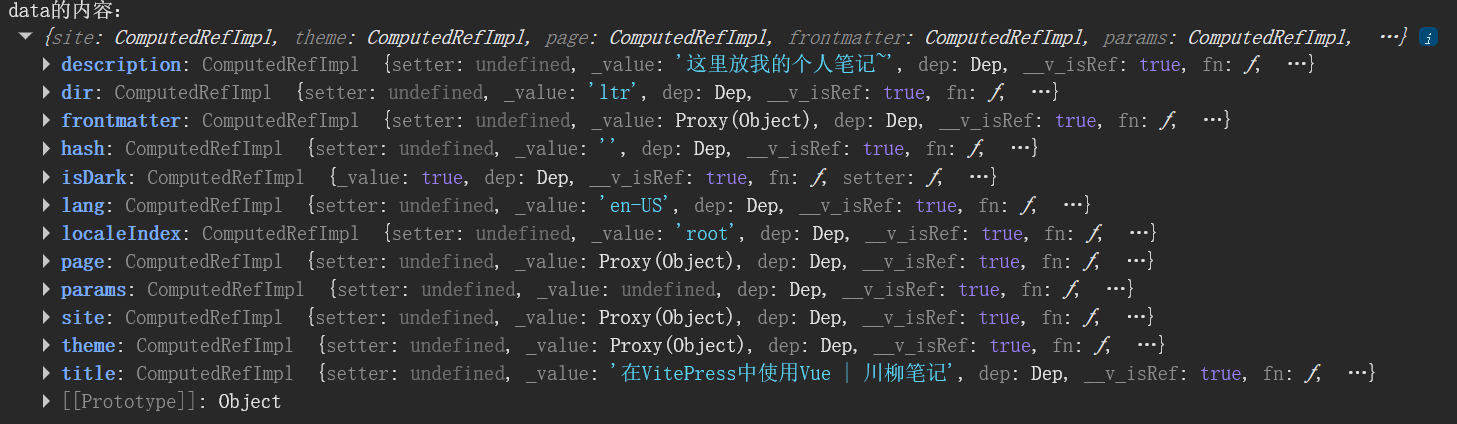
使用 Vue 组件
可以直接在 Markdown 文件中导入和使用 Vue 组件。
导入组件
如果一个组件只被几个页面使用,建议在使用它们的地方显式导入它们。这使它们可以正确地进行代码拆分,并且仅在显示相关页面时才加载:
<script setup>
    import MyComponent from './components/MyComponent.vue'
</script>

应用我自己的组件:
<MyComponent />
查看组件源码
<script setup lang="ts">
import { ref, onMounted, onUnmounted } from 'vue'

const colors = ['#e74c3c', '#e67e22', '#f1c40f', '#2ecc71', '#3498db', '#9b59b6']
const i = ref(0)
let timer: number

onMounted(() => {
  timer = setInterval(() => { i.value = (i.value + 1) % colors.length }, 500)
})

onUnmounted(() => clearInterval(timer))
</script>

<template>
  <span class="rainbow" :style="{ color: colors[i] }">你好!</span>
</template>

<style scoped>
.rainbow {
  font-size: 2rem;
  font-weight: bold;
  transition: color 0.3s;
}
</style>
效果:
应用我自己的组件:
你好!全局组件
如果一个组件要在大多数页面上使用,可以通过自定义 Vue 实例来全局注册它们。有关示例,请参见自定义主题中的相关部分。
警告
确保自定义组件的名称包含连字符或采用 PascalCase。否则,它将被视为内联元素并包裹在 <p> 标签内,这将导致激活不匹配,因为 <p> 不允许将块元素放置在其中。
提示
更多内容请查阅官方文档